 KES
 NGN - Nigeria
 ZAR - South Africa
 USD - International

MyBB is a free, open-source forum script that has powered community discussion boards for years. It’s light, fast and easy to run, which makes it a good choice for a community, a school or alumni group, a customer support forum or a hobby club. This guide shows how to install it with Softaculous in cPanel, then how to set it up so it attracts members instead of spammers.
Is a forum still worth it?
Social media groups are convenient, but a forum on your own domain is searchable on Google, owned by you and organised by topic, so good answers don’t disappear in a timeline. Many support communities and niche groups still run forums for exactly those reasons.
Install MyBB step by step
1. Log into your cPanel account.
2. In the Software section, open Softaculous Apps Installer.

3. You will be redirected to the Softaculous Panel.
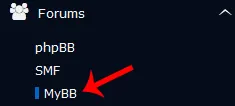
4. On the left sidebar, find the Forums category. Click on this followed by a click on the MyBB that will appear under this category.
5. Click on the Install button.
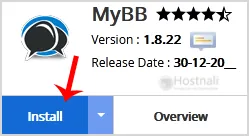
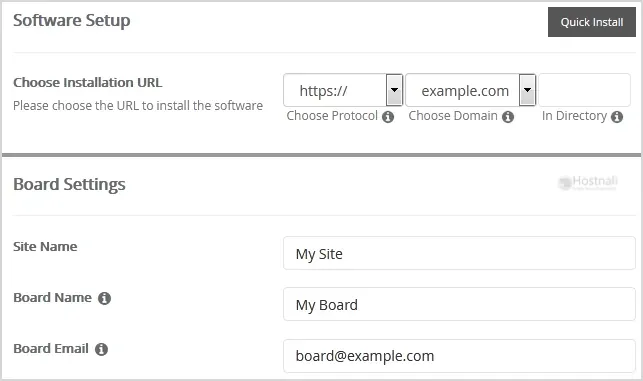
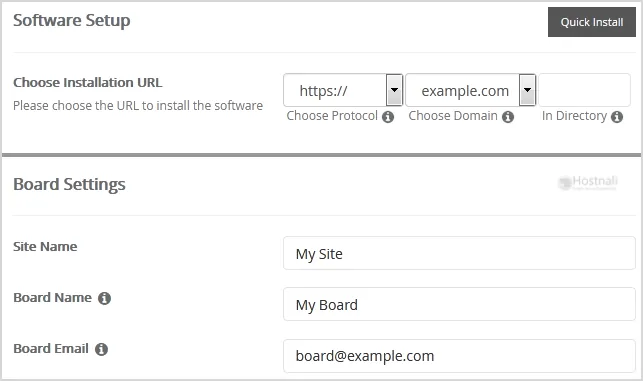
6. You then have to fill the mandatory fields under the Software Setup field:
- Choose Installation URL: Choose the appropriate protocol/domain. Inside the “In Directory” field, should you want to install this in a directory, i.e., hostnali.co.ke/directory, enter the directory name. Otherwise, leave it blank to install in your main domain, i.e., hostnali.co.ke
7. Specify the details using this guide in the Board Settings field:
- Site Name: Fill in the name of your site, i.e My Website.
- Board Name: Name of the forum.
- Board E-mail: The e-mail address of the forum.
8. Under the Admin Account field, fill in the information following this guide
- Admin Username: Your new MyBB username (for security reason do not use the Administrator or the Admin username.)
- Admin Password: Use a strong password.
- Admin Email: Your e-mail address. (Useful for administrator account password reset, notification, etc.)
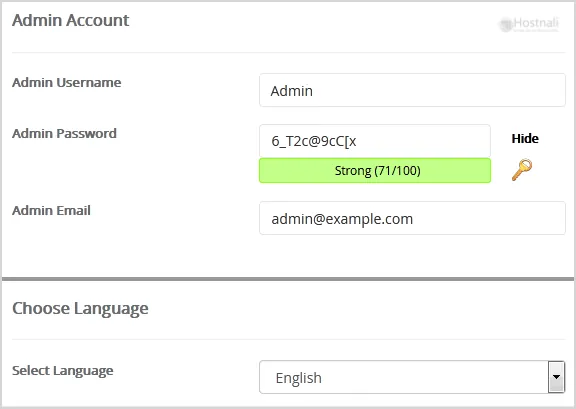
Note: You need to remember the username and the password because you will need these login details to access the admin area of your MyBB Forum.
9. Specify the details using this guide in the Choose Language field:
- Select Language: The default language of the forum is English.
10. Advanced Options: Leave this as default unless you really want to alter the database name or configure automated backups. Please kindly keep in mind that frequent backups eat up your disk space.
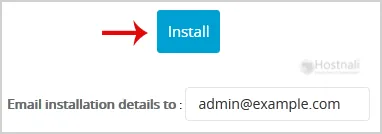
Finally, scroll down to the end of the page and click on the Install button.
First settings after installing
- Log in to the Admin CP at yourdomain/forum/admin (or the folder you chose).
- Board settings: Configuration → Settings → General Configuration: board name, URL and contact email.
- Create your forums and categories: Forums & Posts → Forum Management. Start with a few broad forums; you can split them later.
- Set user groups and permissions: who can read, post, reply and attach files.
- Turn on search-engine-friendly URLs (Configuration → Settings → Server and Optimization Options) for cleaner addresses.
Stopping spam sign-ups
Forums attract spam bots. Set these up before you announce your forum:
- Registration: require email activation or admin approval for new accounts.
- CAPTCHA: enable reCAPTCHA or hCaptcha on registration (Configuration → Settings → User Registration and Profile Options).
- Security question at sign-up, about your topic.
- New-member limits: no links or signatures until a member has a few approved posts.
- Moderation queue for first posts.
Themes, plugins and growing your forum
- Install themes and plugins from the official MyBB extend site; upload them in File Manager and activate in the Admin CP.
- Useful plugins: spam protection, social sign-in, thank-you/like buttons and SEO improvements.
- Seed the forum with good questions and answers before you invite members; an empty forum doesn’t attract posts.
Updates and backups
Keep MyBB and its plugins up to date through Softaculous or the official upgrade script, and take a Softaculous backup before each update. Daily server backups are included with every Hostnali plan as well.
Frequently asked questions
Is MyBB free?
Yes. MyBB is open source and free to use, and Softaculous is included with every Hostnali plan.
Which hosting plan do I need for a forum?
A small to medium forum runs well on web hosting. Very busy forums with thousands of daily visitors may need cloud or corporate hosting.
MyBB or SMF?
Both are free and mature. MyBB has a larger theme and plugin library; SMF is known for stability and detailed permissions. See how to install SMF.