 KES
 NGN - Nigeria
 ZAR - South Africa
 USD - International

Is your IP frequently blocked when you access a WordPress admin area or any script with a web browser? Are you left with the feeling that your IP is blocked or that the server is down or it is not working?
If the answer is Yes, then it may have happened as a result of Mod Security.
What is Mod Security?
ModSecurity is a module that protects your website from various types of attacks. Mod Security protects our website from hackers, attacks, a brute force attack, a cross-site request forgery(CSRF), and many other threats. Although it sometimes creates a problem, we do not recommend you to disable it but instead fix your software’s vulnerability. The reason for this is that ModSecurity only blocks your website if your software security is terrible.
Disabling ModSecurity can help you determine whether ModSecurity blocks your IP or your client/visitor’s IP. However, if it is not the case, it means that your IP is blocked for a different reason. However, if you are sure that ModSecurity is the reason your IP is blocked, contact us, and we will find the exact reason behind it to resolve your issue so that you will not be required to disable the module.
How to Enable or Disable Mod Security in cPanel?
1. Log into your cPanel account.
2. In the Security section, open the app installer by clicking on the ModSecurity Icon.
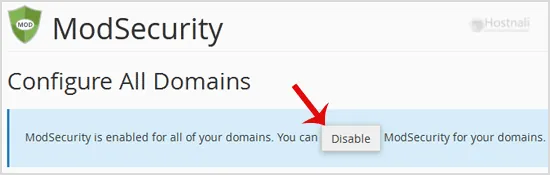
3. If ModSecurity is enabled, it will show a Disable option. Click it, and ModSecurity will be disabled on all domains. The next time you want to enable it, you will only need to click on Enable. This will enable it for all domains.
How to Disable ModSecurity Only on Selected Domains and not on All Domains?
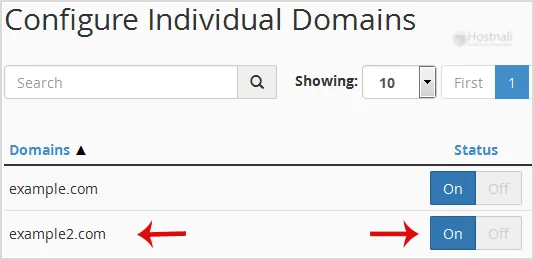
You may have multiple domains, and you wish to disable or enable ModSecurity only on selected domains.
1. Login to cPanel, and from the Security section, open the app installer by clicking on the ModSecurity Icon.
2. Scroll down to the bottom of the page.
3. Under the Status option next to the domain, click on On or Off.
Why ModSecurity blocks legitimate visitors
ModSecurity is a web application firewall: it checks every request against a set of rules that describe known attacks. Occasionally a normal action looks like an attack to a rule, for example:
- saving a post that contains code snippets or SQL-like text,
- uploading files through a form or page builder,
- long or unusual URLs from a plugin’s admin screen,
- an API call or payment callback with unusual parameters.
The result is a 403 Forbidden error, a “Not Acceptable” page, or a form that silently fails.
Diagnose before you disable
- Note exactly what you were doing and the time, and the page address.
- Turn ModSecurity off for that one domain only (the per-domain switch above) and repeat the action.
- If it now works, ModSecurity was the cause. Turn it back on straight away.
- Send us the details in a ticket: domain, page, time and what you did. We find the rule ID in the server logs and whitelist that single rule for your site, so the rest of the protection stays on.
If turning it off makes no difference, the block comes from somewhere else, for example a security plugin, a login limiter or your IP being blocked after failed logins. Our team can check that too.
Don’t leave it switched off
With ModSecurity off, your site loses protection against common attacks such as SQL injection, cross-site scripting and malicious bots probing for weak plugins. Always switch it back on after testing, and let us fix the specific rule instead.
Other protection on Hostnali servers
ModSecurity works alongside other layers on our servers, including Imunify360 malware scanning and server firewalls, plus account isolation with CloudLinux. Keeping WordPress, themes and plugins updated and using strong passwords does the rest. See how to secure your website from hackers.
Frequently asked questions
Is it safe to disable ModSecurity?
Only briefly, to test. Leaving it off removes an important layer of protection.
ModSecurity keeps blocking my page builder. What can I do?
Open a ticket with the page and the time. We’ll whitelist the specific rule for your domain so the builder works and protection stays on.
Does ModSecurity slow my website down?
The effect is very small on modern servers, and far smaller than the cost of a hacked website.