 KES
 UGX - Uganda
 TZS - Tanzania
 RWF - Rwanda
 NGN - Nigeria
 ZAR - South Africa
 USD - Zimbabwe
 GHS - Ghana
 ETB - Ethiopia
 ZMW - Zambia
 USD - International

NaliSuite feature · Bank and M-Pesa reconciliation
Bank and M-Pesa Reconciliation in Kenya
Match every bank and M-Pesa transaction to its invoice or bill in minutes, not days.
Import bank and M-Pesa statements, or connect bank feeds, and NaliSuite suggests the invoice, bill or payment each line belongs to. Confirm the matches, and the books are reconciled and ready to close.
- Bank and M-Pesa statements imported or fed in automatically
- Matches suggested for every line
- Period closed with statements ready to share
What you get
Bank and M-Pesa reconciliation: what it does
Statement import
Upload M-Pesa and bank statements in the usual export formats.
Bank feeds
With the Bank Feeds add-on, transactions arrive by themselves every day.
Suggested matches
Amounts, references and dates are compared with open invoices and bills, and the best match is offered.
Many to one
Match one payment to several invoices, or several payments to one, with any difference written off.
Automatic double entry
Invoices, bills, payments and payroll post themselves, so reconciliation is the only check left.
Statements ready
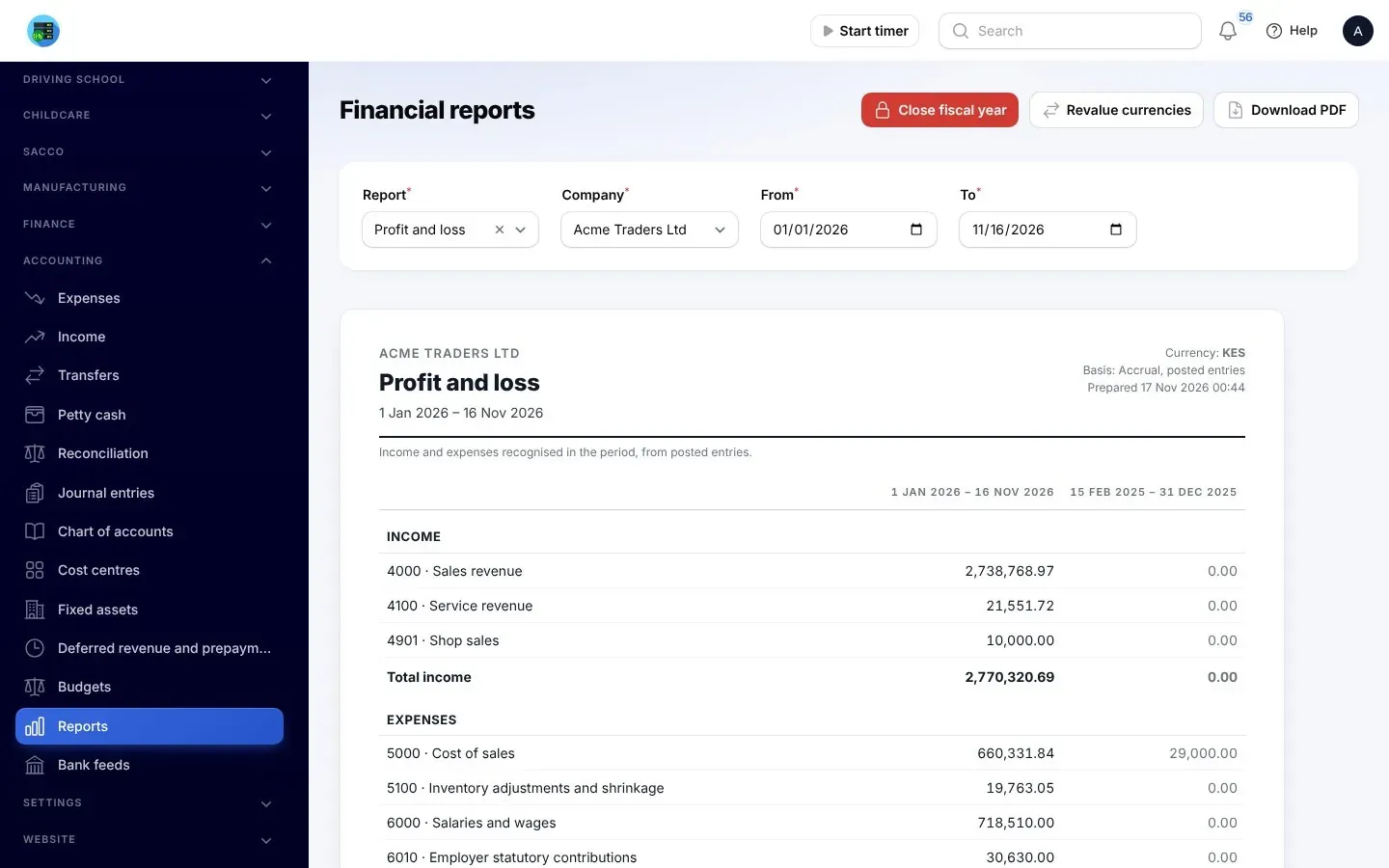
Profit and loss, balance sheet and cash flow with prior-period comparison, as soon as you close.
How it works
Up and running in three steps
- Import a statement or connect a bank feed for each bank and M-Pesa account
- Review the suggested matches and confirm them
- Close the period and share the financial statements
Apps behind it
The NaliSuite apps that make it work
Built-in apps come with every plan; add-ons are optional extras from the marketplace.
- AccountingDouble-entry books that post themselves, with bank and mobile money reconciliation.
- Invoicing and PaymentsInvoices with a pay link (M-Pesa, Airtel Money or card), reminders and statements.
- PurchasesRequests, purchase orders, approvals and supplier bills in one flow.
- Bank feeds Add-onBank transactions arrive by themselves, matched to invoices, bills and payments
- QuickBooks, Xero, Sage and Zoho Books sync Add-onInvoices, bills and payments synced with QuickBooks, Xero, Sage or Zoho Books
- Document AI Add-onSupplier invoices and receipts read for you and turned into bills or expenses
Bank and M-Pesa reconciliation
Bank and M-Pesa Reconciliation in Kenya
NaliSuite is accounting software with bank and M-Pesa reconciliation built in, for businesses in Kenya. Statements are imported or fed in, matched to invoices and bills with suggestions, and the books close faster every month.
Because every sale, purchase, payment and payslip already posts itself, reconciliation is the last step rather than a second round of data entry.
Reviews
What our clients say about Hostnali
This has to be one of the best (reponsive) service I have experienced in my life. The useless host i was using couldn't fix the issues I had in 48 hours. I switched to Hostnali and it was fixed in less than 2 hours. You won't regret using this service.
Ogunronbi Victory8 months ago
The after-sales support is incredible. I was consistently impressed by the customer support team’s responsiveness; they were available at all hours, including late at night, providing prompt assistance whenever I needed it.
Rajan G (Rajan)8 months ago
Super fast support. Thanks to hostnali I own a reseller company now
Lord sill4 months ago
Questions
Bank and M-Pesa reconciliation: frequently asked questions
Can I reconcile M-Pesa statements?
Yes. Import M-Pesa statements like bank statements; each transaction is matched to its invoice, bill or payment with suggestions.
Do I still need an accountant?
NaliSuite keeps the books up to date as you work. Many businesses still use an accountant for tax filing and advice, and you can invite them in as a user.
Can it sync with QuickBooks or Xero?
Yes. Two-way sync with QuickBooks and Xero is available as an add-on, if your accountant works in one of them.
How often should I reconcile?
Weekly is a good habit. With bank feeds and suggested matches it takes a few minutes, and month-end close becomes a quick check.
Is bank and M-Pesa reconciliation included in every NaliSuite plan?
Yes. It is part of NaliSuite on every plan, from Ksh 250 a month, with a free trial to start. Marketplace add-ons mentioned on this page are optional extras.
Try bank and M-Pesa reconciliation with your own data
Start a free trial of NaliSuite, the cloud ERP also known as Hostnali Business Suite (HBS).