
Recommended Services
Supported Scripts
WordPress
Hubspot
Joomla
Drupal
Wix
Shopify
Magento
Typeo3
What Is cPanel? A Beginner’s Guide for Kenyan Website Owners
One of the first questions every entrepreneur asks before going online is:
Whether you’ve just purchased web hosting or you’re planning to launch your first website, you’ll likely come across the term cPanel. While it may look technical at first, cPanel is actually one of the easiest tools for managing a website.
With cPanel, you don’t need advanced programming knowledge to upload files, install WordPress, create business emails, manage databases, or secure your website.
In this beginner-friendly guide, you’ll learn what cPanel is, what it does, and how to use it to manage your website efficiently.
Quick Answer / TL;DR
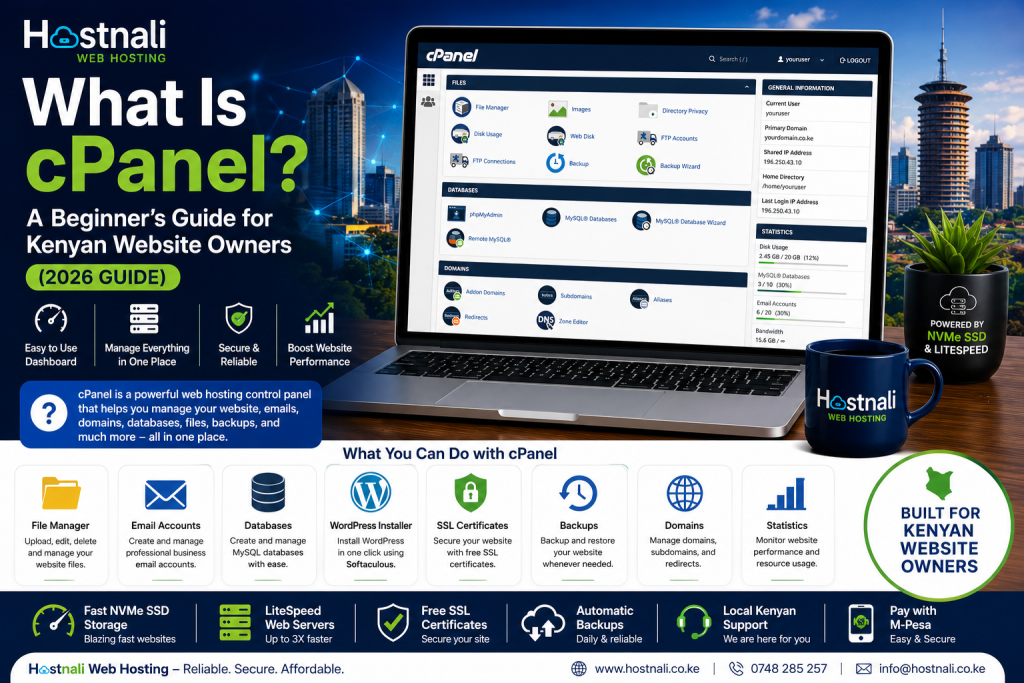
cPanel is a web-based hosting control panel that helps you manage your website through an easy-to-use dashboard.
With cPanel, you can:
- Upload website files
- Install WordPress
- Create business email accounts
- Manage domains
- Create databases
- Generate backups
- Install SSL certificates
- Monitor website performance
Most web hosting providers, including Hostnali, include cPanel with their hosting plans.
What Is cPanel?
cPanel is a graphical control panel that allows website owners to manage their hosting account without using command-line tools.
Instead of typing complex server commands, you can complete most website management tasks with just a few clicks.
Think of cPanel as the “control center” for your website.
Why Is cPanel Important?
Every website requires ongoing management.
Without cPanel, tasks such as creating email accounts, installing WordPress, or backing up your website would require technical knowledge.
cPanel simplifies these tasks, making website management accessible to beginners and experienced users alike.
Main Features of cPanel
1. File Manager
The File Manager lets you:
- Upload website files
- Edit files
- Delete files
- Create folders
- Compress and extract ZIP files
- Manage the
public_htmldirectory
You can update your website directly from your browser without needing FTP software.
2. One-Click WordPress Installation
Most cPanel accounts include Softaculous, which allows you to install WordPress in just a few minutes.
The process usually involves:
- Selecting WordPress.
- Choosing your domain.
- Entering your website details.
- Clicking Install.
No coding is required.
3. Email Account Management
Create professional business email addresses like:
You can also:
- Reset passwords
- Set mailbox quotas
- Configure email forwarding
- Access webmail
4. Database Management
Many websites, including WordPress, store data in databases.
Using cPanel, you can:
- Create MySQL databases
- Add database users
- Assign permissions
- Manage databases with phpMyAdmin
5. Domain Management
From cPanel, you can manage:
- Addon domains
- Subdomains
- Parked domains
- Redirects
- DNS settings (depending on your hosting plan)
This makes it easier to manage multiple websites from one account.
6. SSL Certificate Management
An SSL certificate secures your website by encrypting data between your visitors and your server.
Most hosting providers include free SSL certificates, which can often be installed or managed directly through cPanel.
Benefits include:
- HTTPS security
- Increased visitor trust
- Better SEO potential
7. Website Backups
Backing up your website is essential.
With cPanel, you can:
- Create full website backups
- Download backup files
- Restore your website (depending on your hosting plan)
- Schedule backups using available tools
Regular backups protect your website from accidental data loss.
8. Security Tools
cPanel includes several security features, such as:
- Password-protected directories
- IP blocking
- Hotlink protection
- Two-factor authentication (on supported systems)
- SSL management
These tools help protect your website from unauthorized access.
9. Metrics and Analytics
You can monitor your website using built-in tools that provide insights into:
- Bandwidth usage
- Visitor statistics
- Disk usage
- Error logs
- Resource consumption
Monitoring these metrics helps you identify performance issues early.
How to Access cPanel
Most hosting providers give you access through one of these methods:
Option 1
Visit:
https://yourdomain.com/cpanel
Option 2
Log into your hosting client area and click Login to cPanel.
Your hosting welcome email usually includes:
- cPanel username
- Password
- Login URL
Common Tasks You Can Perform in cPanel
Here are some of the most common tasks for beginners:
- Install WordPress
- Upload website files
- Create business email accounts
- Manage databases
- Install SSL certificates
- Set up cron jobs
- View website statistics
- Manage backups
- Configure redirects
- Create FTP accounts
Common Mistakes Beginners Should Avoid
Deleting Important Files
Avoid deleting files unless you’re certain they are no longer needed.
Ignoring Backups
Always create a backup before making major changes to your website.
Using Weak Passwords
Protect your cPanel account with a strong, unique password and enable two-factor authentication if available.
Running Out of Disk Space
Regularly remove unnecessary backups, emails, and unused files to prevent storage issues.
Benefits of Using cPanel
Using cPanel helps you:
- Save time
- Manage your website without coding
- Improve website security
- Simplify WordPress installation
- Create professional email accounts
- Monitor website performance
- Keep your website organized
Whether you’re a beginner or an experienced website owner, cPanel makes website management more efficient.
Why Choose Hostnali Hosting?
Hostnali includes an intuitive cPanel interface with its hosting plans, making it easy to manage your website.
Benefits include:
- Easy-to-use cPanel dashboard
- One-click WordPress installation
- Free SSL certificates
- Fast NVMe SSD storage
- LiteSpeed Web Servers
- Unlimited business email accounts on eligible plans
- Automatic backups
- Local Kenyan support
- M-Pesa payment options
Whether you’re launching your first website or managing multiple domains, Hostnali provides the tools you need to succeed.
Frequently Asked Questions
Is cPanel free?
cPanel is typically included with your hosting plan, though some providers may charge separately depending on the package.
Can I build a website using cPanel?
cPanel helps you manage your hosting account, while website builders or WordPress are used to create the actual website.
Is cPanel suitable for beginners?
Yes. cPanel is designed with an easy-to-use graphical interface that simplifies website management.
Can I install WordPress from cPanel?
Yes. Most hosting accounts include one-click WordPress installation through Softaculous.
Can I create business emails in cPanel?
Yes. You can create and manage professional email accounts associated with your domain.
Does Hostnali include cPanel?
Yes. Hostnali provides cPanel with its hosting plans, making it simple to manage websites, emails, and databases.
Final Thoughts
Learning to use cPanel is one of the most valuable skills for any website owner. It simplifies tasks that would otherwise require technical expertise and gives you greater control over your hosting account.
Whether you’re running a personal blog, business website, or ecommerce store, cPanel helps you manage your online presence efficiently and securely.
Ready to launch your website?
Visit Hostnali Web Hosting to explore hosting plans with cPanel, free SSL certificates, and WordPress-ready infrastructure.