 KES
 UGX - Uganda
 TZS - Tanzania
 RWF - Rwanda
 NGN - Nigeria
 ZAR - South Africa
 USD - Zimbabwe
 GHS - Ghana
 ETB - Ethiopia
 ZMW - Zambia
 USD - International

AI is everywhere in Kenyan business news, but most small business owners in Nairobi, Mombasa or Eldoret are asking a simpler question: what would it actually do for me on a normal Tuesday?
The honest answer depends on who in the business is using it. This guide looks at AI role by role, owner, bookkeeper and customer support, then covers the practical side: data, cost and how to start.
For the owner: answers without building reports
Owners rarely lack data. Sales are in the till, invoices in the accounts, M-Pesa payments in the statements. What they lack is time to pull it together.
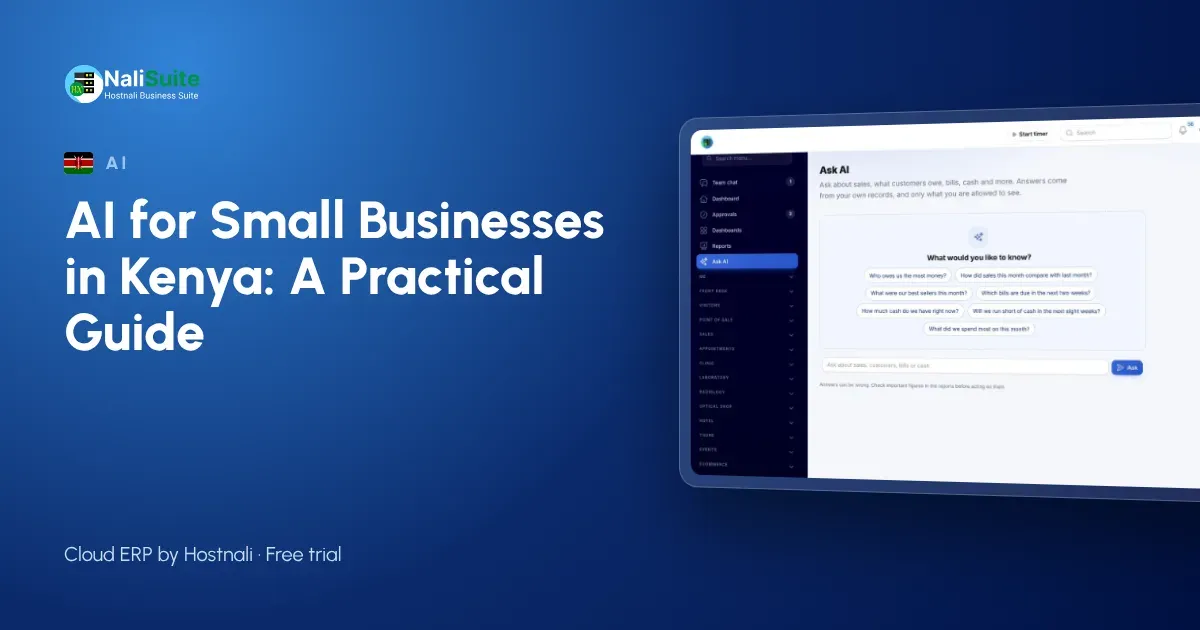
An AI assistant that reads your own records changes that. Instead of exporting to Excel, you ask in plain words:
- “Who owes us the most right now?”
- “Which products sold best last month?”
- “Will we run short of cash next month?”
NaliSuite’s AI business assistant answers questions like these from your live sales, invoices, bills and books. It also gives a cash-flow forecast showing money in and out week by week, with a summary in plain words. Each person only gets answers from what their role allows them to see, so a branch manager cannot ask about the whole group’s margins.
Treat the answers as a starting point. If a figure matters, for example before you sign a loan or a large order, open the report behind it and check.
For the bookkeeper: fewer bills typed by hand
In many Kenyan businesses, someone spends hours each month typing supplier invoices and till receipts into the books. That is exactly the kind of task AI document reading is good for.
With Document AI, you upload a supplier invoice as a PDF or snap a receipt with your phone. It reads the supplier, invoice number, dates, lines, VAT and totals, and matches the supplier by KRA PIN or name, or adds a new one. You check what was read, then save it as a draft bill or, for a receipt already paid, an expense.
The check step matters. Nothing reaches the books until a person has looked at it, which is how it should be.
For customer support: a first draft of every reply
If you answer customer questions through a helpdesk, the AI assistant drafts replies on tickets, ready for the agent to edit and send. For a small team answering the same questions about delivery, payment and returns, a good first draft saves time on every ticket. The agent still decides what goes out.
See how tickets work in the Helpdesk app.
Outside NaliSuite: everyday writing
General AI tools are also useful for writing tasks most owners put off: a first draft of a product description, a job advert, a polite reminder to a customer, or a summary of a long document. Two rules apply. Read and edit everything before you send it, and do not paste customer or staff personal data into tools you have not checked.
Data and the Kenya Data Protection Act
Kenya’s Data Protection Act applies when you process customer and staff personal data, including with AI tools. Before you switch anything on:
- Know what data the tool sends and where.
- Use it for clear business purposes.
- Limit who in the business can use it.
NaliSuite’s AI add-ons use your own Anthropic API key, under your own account and its terms. NaliSuite sends only what each request needs.
What it costs
There are two parts. Each AI add-on is a NaliSuite marketplace add-on to any plan. The AI usage itself is billed by Anthropic to your own key, so you see exactly what you use and manage it in your own Anthropic account. Start small, watch the usage for a month, then decide. A business that only reads a few dozen supplier bills a month will use far less than one asking questions all day, so the cost follows how much you actually rely on it.
How to start in one week
- Pick one job: either supplier bills or owner questions, not both.
- Add the matching add-on and enter your Anthropic API key in Settings.
- Use it every day for a week, and check every result.
- Decide whether it saved time. If it did, add the second job.
Read more about how AI fits into the system on the AI in NaliSuite page.
What a good first month looks like
After four weeks, a typical small business should be able to say three things: which job AI now does, roughly how many hours it saves, and how often a person had to correct it. If you cannot answer those, narrow the job down and try again for another month.
Frequently asked questions
Will AI replace my accountant?
No. It reads documents and answers questions from your records; your accountant still reviews the books, advises you and files returns with KRA.
Can AI post entries to my books without me?
No. Document AI prepares the record and you check and confirm it.
Do I need technical skills?
No. You add the add-on, paste your API key in Settings and then type questions or upload documents.
Is my data used to train AI models?
NaliSuite sends only what each request needs, using your own Anthropic API key under your own account and its terms.
Try NaliSuite
NaliSuite plans start at Ksh 250 a month with a free trial, and the AI add-ons can be added to any plan. See the plans.