 KES
 UGX - Uganda
 TZS - Tanzania
 RWF - Rwanda
 NGN - Nigeria
 ZAR - South Africa
 USD - Zimbabwe
 GHS - Ghana
 ETB - Ethiopia
 ZMW - Zambia
 USD - International

Most small teams in Kenya run projects from a WhatsApp group, a notebook and the owner’s memory. That works for two jobs at a time. By the fifth job, deadlines slip, nobody knows who promised what to the client, and the owner discovers at the end that a project ate more staff time than it earned.
This guide shows how a team of five to thirty people can plan, run and bill projects without hiring a project manager or learning complicated software.
Where projects go wrong in a small business
Picture an interior fit-out company in Westlands, Nairobi, with eleven staff. It is fitting out a dental office in Kilimani, a restaurant in Karen and three apartments in Kileleshwa at the same time. The carpenters, the electrician and the site supervisor move between all of them.
The trouble starts in small ways:
- The supervisor tells the restaurant client the counters arrive on Friday, but the workshop has them down for the following Wednesday.
- Two carpenters turn up at Kileleshwa while Karen waits for anyone at all.
- Hours spent on extra work the client asked for on site are never written down, so they are never invoiced.
- The owner only learns that Kilimani went over budget when the final invoice is already sent.
None of these is a disaster on its own. Together they cost the business its margin and its reputation.
Five habits that fix most of it
1. One place for every task
Every task belongs to a project and has one owner and a due date. “Order the hinges” with no name next to it is a wish, not a task. In NaliSuite Projects each task has an assignee, a due date and a checklist, and the whole team sees the same list.
2. A board the team actually looks at
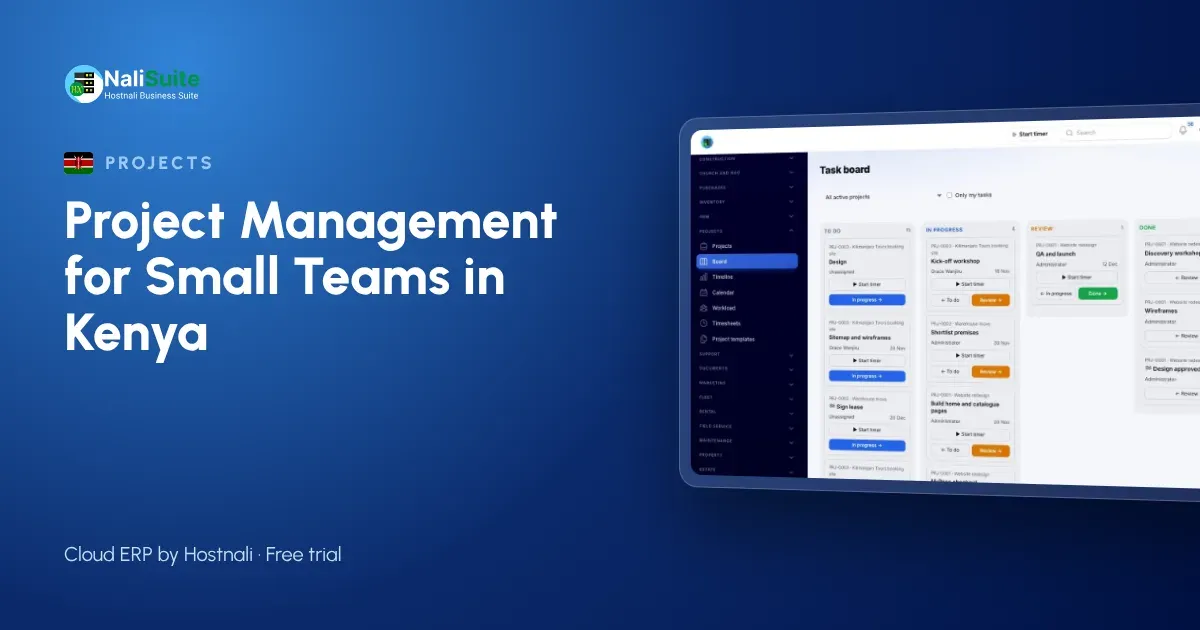
A Kanban board with columns such as To do, In progress, Waiting for client and Done shows the state of a job at a glance. The timeline view shows when tasks overlap, which is where clashes like the two carpenters in the same apartment become visible a week early.
3. Templates for repeat work
If you fit out apartments every month, the steps are almost the same each time. Save them as a project template once and every new job starts with the full task list, instead of relying on whoever remembers the steps.
4. Time written down the same day
Ask staff to log time against the project from a timer or a timesheet, and have a manager approve it each week. Approved time is what lets you bill extra work and see the true cost of each job.
5. One weekly review
Thirty minutes every Monday: which tasks are late, who is overbooked, which client is waiting on us. The workload view shows who has too much and who has room.
Tools compared
| WhatsApp group | Spreadsheet | Project app | |
|---|---|---|---|
| Who owns each task | Lost in the chat | Possible, rarely kept up | Always shown |
| Deadlines and clashes | Not visible | Manual | Timeline and calendar |
| Time spent | Not recorded | Separate sheet | Logged on the task |
| Billing extra work | From memory | Copy and paste | Invoice from approved time |
| Profit per project | Guesswork | Hard | Revenue against staff cost |
WhatsApp is still useful for quick messages. It just should not be where the plan lives.
Billing projects properly
Kenyan clients usually pay for project work in one of three ways: a fixed price, stage payments (deposit, mid-point and completion), or time and materials. Projects supports all three: invoice approved time at your rates, a fixed price, or milestones as each stage is finished.
The fit-out company above could set three milestones for the restaurant job and send each invoice from NaliSuite Invoicing the day the stage is signed off, with an M-Pesa or card payment option on the invoice. Extra work requested on site is logged as time, approved, and added to the next invoice rather than forgotten.
If you are registered for eTIMS, invoices raised in NaliSuite can go through the KRA eTIMS connection once you have your own eTIMS credentials from KRA.
Keeping clients in the loop
A lot of project stress comes from clients calling to ask how things are going. Give them a way to see for themselves. Projects can be shown in the customer portal, where the client follows progress, sees invoices and downloads shared files such as drawings or a signed variation.
Fewer “just checking” calls means the supervisor spends the day on site, not on the phone.
Knowing which projects make money
At the end of each job, compare what you billed with the cost of the time logged. Profitability in Projects does this for you once time is approved. After a few months, patterns appear: perhaps restaurant fit-outs pay well while small apartment jobs barely cover the travel across Nairobi traffic. That is the information that should shape your next quote.
A simple starting plan
- List the projects you are running today and create each one, even with only a few tasks.
- Give every task an owner and a date.
- Ask the team to log time for two weeks.
- Hold the Monday review and adjust.
- Turn your most common job into a template.
Staff data, such as phone numbers and hours worked, is personal data under Kenya’s Data Protection Act, so give each person access only to the projects they work on.
Frequently asked questions
Do my site staff need a computer?
No. NaliSuite runs in the browser on a phone, so a supervisor can update tasks and log time from site.
Can I bill a client for hours spent on extra work?
Yes. Approved time becomes invoice lines at the rates you set, so variations requested on site are billed with the next invoice.
Can the client see the project without calling us?
Yes. Projects can be shown in the customer portal, where clients follow progress and download shared documents.
Try NaliSuite
Projects, invoicing and the customer portal are built into every NaliSuite plan, from Ksh 250 a month. Compare the plans and start a free trial with one live project.